Most WordPress site owners don't realise how many cookies their site sets until they actually audit it. A standard plugin stack with Google Analytics, a contact form, and a social sharing button can easily load a dozen cookies on a single page visit. Privacy laws in most major markets require you to disclose all of them.
A cookie policy is how you do that. This guide covers what it needs to say, which laws require it, and how to create one without spending hours writing legal text or worrying about keeping it up to date.
What is a cookie policy?
A cookie policy is a legal document that tells your visitors what cookies your site uses, what data those cookies collect, which third parties can access that data, and how long each cookie stays active on their device.
It functions as a transparency notice rather than a consent tool. Your consent banner handles the ask; your cookie policy handles the explanation. The two work together, and regulators expect both.
A cookie policy is often confused with a privacy policy. The difference is scope. A privacy policy covers everything your website does with personal data, including names, email addresses, and payment details. A cookie policy covers cookies and tracking technologies only. Most websites need both as separate documents.
Does your WordPress site need a cookie policy?
For most sites, yes. WordPress itself sets only a handful of cookies by default, mainly for logged-in users and comment authors. The count grows quickly once you start adding plugins.
Common plugins and integrations each bring their own cookies. An analytics tool like Google Analytics sets session and traffic-source cookies. An ecommerce plugin like WooCommerce adds cart management cookies. Marketing tools like Facebook Pixel or Google Ads introduce tracking cookies that follow users across other websites. A contact form plugin, an SEO plugin, a live chat widget — each one is a potential addition to your cookie inventory. Depending on what you've installed, you could be running ten or more cookies without realising it.
Whether publishing a cookie policy is a legal requirement depends on where your visitors are located, not where your business is based. The main frameworks to know are:
GDPR and the ePrivacy Directive (EU)
Any site with visitors in the EU must disclose all cookie usage and obtain consent before placing non-essential cookies. The ePrivacy Directive is the specific regulation that governs cookies; GDPR sets the consent standard they must meet. A cookie policy is required under both.
UK GDPR and PECR
The UK's Privacy and Electronic Communications Regulations apply the same standard as the EU's ePrivacy Directive. UK visitors are covered separately from EU visitors since Brexit, so if your audience spans both, both frameworks apply.
CCPA and CPRA (California)
California residents have the right to know what personal data is collected about them, which includes cookie-based data. Disclosure is required for any commercial site with California visitors.
Other markets
Brazil's Lei Geral de Proteção de Dados (LGPD), Canada's PIPEDA, and Singapore's Personal Data Protection Act all carry similar disclosure requirements. If your site draws international traffic, the obligation to publish a cookie policy applies across most of your key markets.
What a WordPress cookie policy must include?
Regulators don't prescribe an exact format, but a compliant policy for a WordPress site needs to cover five areas.
What cookies are
A brief plain-language explanation at the top of the document. Not all visitors know what a cookie is or how it works. Defining it clearly at the outset, something like 'cookies are small text files placed on your device to remember your preferences and browsing behaviour', sets the right tone.
Cookie categories
Cookies are grouped into four types: strictly necessary, functional, analytical, and marketing. The category determines whether you need user consent before placing the cookie. Strictly necessary cookies are generally exempt; the other three require consent under GDPR and most equivalent frameworks.
A cookie table
The most substantive part of the policy. For each cookie, the table should list the name, provider, purpose, and expiry duration. The _ga cookie set by Google Analytics, for instance, should be listed with its two-year lifespan and a description of its tracking function. This level of specificity is what regulators expect.
Third-party disclosures
If any external service sets cookies on your site, you are responsible for disclosing it. This is where many manually written policies fall short. Most WordPress owners don't realise how many third-party cookies a standard plugin stack introduces, and regulators don't accept 'I didn't know' as a defence.
How visitors can manage their preferences
Your policy should explain how visitors can withdraw or change their consent, including through your consent banner, browser-level settings, and opt-out links for specific services like Google Analytics. Under GDPR, withdrawing consent must be as easy as giving it.
Why cookie policies go out of date so quickly?
Publishing a cookie policy once and leaving it there is one of the most common compliance mistakes WordPress site owners make. The policy that was accurate in January may not be accurate by March if you've added or removed any plugins in the meantime.
Install a caching plugin and it sets a new cookie. Embed a YouTube video and it loads third-party cookies from Google. Switch from Universal Analytics to GA4 and the old cookie names disappear while new ones appear. Each of these changes should trigger an update to your policy, but in practice they rarely do because nobody has time to audit their cookie inventory every time they touch their site.
Data protection authorities across Europe have shown a clear willingness to act on cookie compliance complaints, including against smaller sites. An outdated policy is not a minor administrative issue; it is a specific failure to meet the transparency requirements of GDPR.
Planning for ongoing maintenance before you choose how to create your policy is therefore as important as the initial setup.
How to create a WordPress cookie policy: manual vs generator
There are three main approaches, and the right one depends on how much ongoing maintenance you're willing to take on.
Write it manually
Practical only if you have legal expertise and a very simple, rarely changing cookie setup. For a typical WordPress site with a plugin-heavy stack, a manual policy is likely to be incomplete within weeks of publishing.
Use a dedicated cookie policy generator
A generator that delivers cookie policy through an embed script, and keeps it updated automatically. Your policy isn't tied to any plugin or any CMS. It's the approach that requires the least ongoing maintenance and works regardless of what platform you're running.
If you move from WordPress to another CMS later, the policy script moves with you. There's no plugin dependency to manage and no risk of your compliance setup breaking after a WordPress update.
How Cookie Policy Generator by CookieYes works for WordPress
Cookie Policy Generator by CookieYes is built around the maintenance problem. Rather than producing a static document, it connects your policy to your site through an embed script that updates it automatically as your cookie setup changes. Setup takes about five minutes.
Step 1: Sign up and scan your site
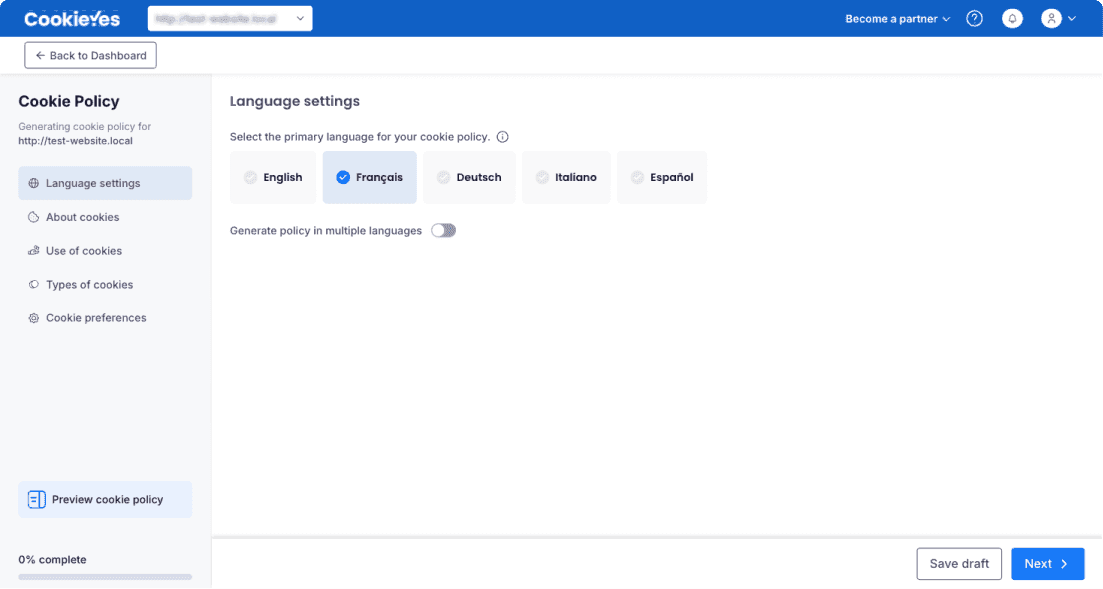
Sign up and enter your WordPress URL. Select your preferred language or languages. Cookie Policy Generator scans your site to detect which cookies are in use, categorises them by purpose (necessary, functional, analytical, marketing), and builds the policy from what it actually finds. You don't start from a generic template.
Step 2: Generate and preview your policy
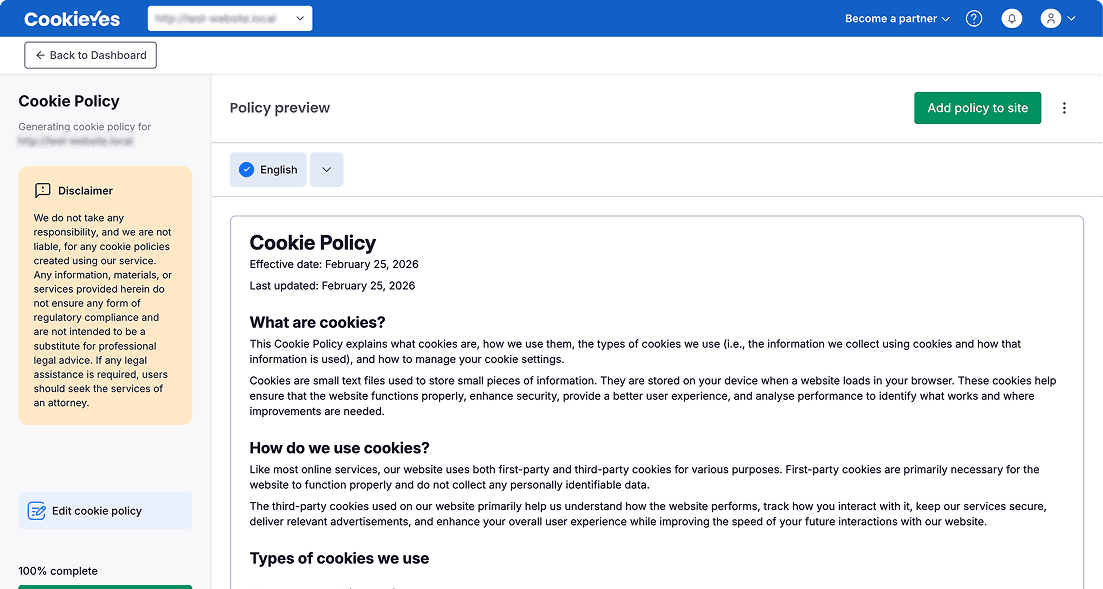
Review the generated policy before publishing. It includes a full cookie table with names, providers, purposes, and expiry durations, third-party disclosures, opt-out instructions, and plain-language descriptions for each cookie category. The structure meets the requirements of GDPR, UK GDPR, CCPA, and other major frameworks. Edit any section before you go live.
Step 3: Deploy to your WordPress site
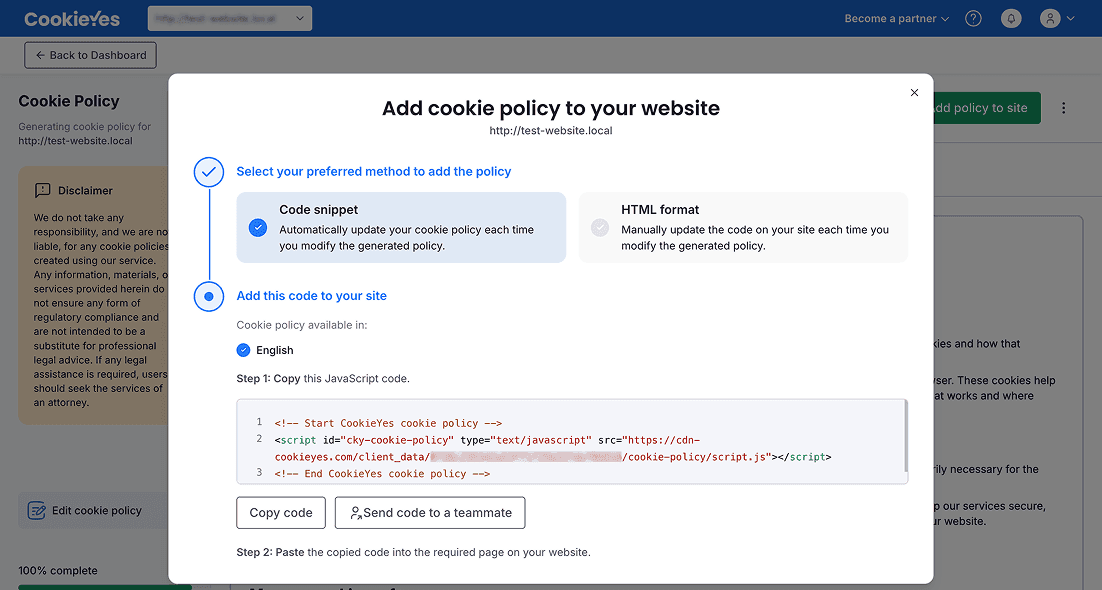
Publish your policy to WordPress via the CookieYes embed script or by copying the HTML directly. The embed script option keeps your policy updated automatically: when your cookie inventory changes, the policy updates without you having to touch it. The same script also powers a cookie consent banner for new visitors, keeping the banner and policy synchronised from a single source.
Before you go live: a compliance checklist
Check these off before you consider your setup complete:
- Your policy lists every cookie currently active on your site, including those set by third-party plugins and embedded content.
- Cookies are categorised correctly as necessary, functional, analytical, or marketing.
- The cookie table includes names, providers, purposes, and expiry durations.
- Third-party service providers are named, with links to their own privacy policies where available.
- The policy page is linked from your site footer on every page.
- The policy is linked from your consent banner.
- Visitors have a working way to change or withdraw their consent at any time.
- The policy shows a last updated date and will reflect future changes automatically.
Frequently asked questions
Get started with Cookie Policy Generator by CookieYes
On a WordPress site where plugins come and go regularly, a cookie policy that only needs to be set up once and then manages itself is a practical advantage. Cookie Policy Generator gives you a compliant, auto-updating policy and a synchronised consent banner in about five minutes of setup.

Shreya
Shreya is the Senior Content Writer at CookieYes, focused on creating engaging, audience-driven blog posts and related content. Off the clock, you’ll find her happily lost in the world of fiction.
Keep reading
GDPR Compliant Cookie Policy: Complete Requirements Checklist
Create a GDPR-compliant cookie policy with essential clauses and transparency guidelines to ensure full EU privacy compliance.

Cookie Policy Template (GDPR & CCPA): Guide and Free Template
Get a free cookie policy template that meets GDPR and CCPA requirements. Includes a step-by-step guide on what to include, how to customize it, and where to display it.